VS2008 was crashing when I started debugging with WCF TestClient.
The Event Viewer as displaying the following : -
.NET Runtime version 2.0.50727.3074 - Fatal Execution Engine Error (73FE5FC0) (80131506)
Fix :
As suggested here : -
http://englestone.blogspot.com/2009/08/net-runtime-version-20507273082-fatal.html
http://blogs.msdn.com/webdevtools/archive/2009/03/03/hotfix-available-for-asp-net-mvc-crashes-with-azure-power-commands-resharper.aspx
https://connect.microsoft.com/VisualStudio/Downloads/DownloadDetails.aspx?DownloadID=16827&wa=wsignin1.0
"Windows6.0-KB963676-x86.msu "
Wednesday, September 23, 2009

Thursday, September 10, 2009
Simple this that can get you in C#.
1. What is indexer in C# ?
Which one of the following code samples implements an indexer?
Choice 1
class CSharp {
public Item[int idx] {
get {...}
set {...}
}
}
Choice 2
class CSharp {
public object Item[int idx] {
get {...}
set {...}
}
}
Choice 3
class CSharp {
public object this[int idx] {
get {...}
set {...}
}
}
Choice 4
class CSharp {
public object CSharp[int idx] {
get {...}
set {...}
}
}
Choice 5
class CSharp {
public class Item[int idx] {
get {...}
set {...}
}
}
-->
2. what is the differnece between readonly and const variables?
--> Const variable, value specified on design time
3. What is a static constructor in C#?
-->
Things to know about Static Constructor
Which one of the following code samples implements an indexer?
Choice 1
class CSharp {
public Item[int idx] {
get {...}
set {...}
}
}
Choice 2
class CSharp {
public object Item[int idx] {
get {...}
set {...}
}
}
Choice 3
class CSharp {
public object this[int idx] {
get {...}
set {...}
}
}
Choice 4
class CSharp {
public object CSharp[int idx] {
get {...}
set {...}
}
}
Choice 5
class CSharp {
public class Item[int idx] {
get {...}
set {...}
}
}
-->
C# introduces a new concept known as Indexers which are used for treating an object as an array. The indexers are usually known as smart arrays in C# community. Defining a C# indexer is much like defining properties. We can say that an indexer is a member that enables an object to be indexed in the same way as an array.
   this [argument list]
{
get
{
 // Get codes goes here
}
set
{
 // Set codes goes here
}
}

Ans is 3 .
2. what is the differnece between readonly and const variables?
--> Const variable, value specified on design time
3. What is a static constructor in C#?
-->
Things to know about Static Constructor
- It is used to initialize static data members.
- Can't access anything but static members.
- Can't have parameters
- Can't have access modifiers like Public, Private or Protected.
Monday, August 17, 2009
Solution for Missing templates on VS2005
First, close Visual Studio. Open a new ‘Visual Studio 2005 Command Prompt’. Once there type the following command at the prompt, press enter and wait…
devenv /installvstemplates
This will rebuild your item and project template cache. Works like a charm.
devenv /installvstemplates
This will rebuild your item and project template cache. Works like a charm.
Friday, August 14, 2009
How to get the innerHTML from Label and update it.
While I was working on a particular web application, I had to have the account number displayed when there was a chagne is dropdown menu. Now, all that worked well with a bit of a javascript.
But, the real issue was after the button was pressed , the page it dispalyed still retained the selected drop down item but the account no. on the label was gone and was being displayed as blank.
Hence, after a bit of the research I found out the easiest way to solve this issue was via implementing another javascript on ButtonClick.
Eg.
OR//
Please note, the mistake the people gerenally make is to put your script before the textbox.
But, the real issue was after the button was pressed , the page it dispalyed still retained the selected drop down item but the account no. on the label was gone and was being displayed as blank.
Hence, after a bit of the research I found out the easiest way to solve this issue was via implementing another javascript on ButtonClick.
Eg.
OR//
Please note, the mistake the people gerenally make is to put your script before the textbox.
When page load , javascript try to execute the code by do not know yet the textbox control and the div.
To be sure that a javascript is executed when all your page is loaded (or DOM built) add defer="defer" on javascript tagSaturday, August 8, 2009
The filename, directory name or volume label syntax is incorrect in VS2005
I have been trying to start a new project in Visual C# Studio 2005 Express and keep getting the error:
the filename, directory name, or volume label syntax is incorrect. (Exception from HRESULT: 0x8007007B)
Solution : -
it appears that you cannot create a project within a path that has an ampersand (&) in it, which my original projects path did. In Tools/Options/Projects and Solutions/General, I selected the "Show advanced build configurations' option. This allows me to select the project build location on creation of a project, and I am now able to ensure it does not try to create in the path with the ampersand in it.
the filename, directory name, or volume label syntax is incorrect. (Exception from HRESULT: 0x8007007B)
Solution : -
it appears that you cannot create a project within a path that has an ampersand (&) in it, which my original projects path did. In Tools/Options/Projects and Solutions/General, I selected the "Show advanced build configurations' option. This allows me to select the project build location on creation of a project, and I am now able to ensure it does not try to create in the path with the ampersand in it.
Friday, August 7, 2009
int i = cmd.ExecuteNonQuery() + SELECT statement
I spent hours trying to figure out why the code wasnt' returning the correct value.
No matter what I do I was only getting -1.
Finally, after few research and all that I found out that SELECT and cmd.ExecuteNonQuery() is no t the way to go.
but instead a simple solution would be to use ExecuteScalar().
But the catch with using ExecuteScalar is to use Select Count(*) from ... instead of Select * from ...
Hence, finally was able to do this by using
Select Count(*) form ...
and then
int i = (int)cmd.ExecuteScalar();
No matter what I do I was only getting -1.
Finally, after few research and all that I found out that SELECT and cmd.ExecuteNonQuery() is no t the way to go.
but instead a simple solution would be to use ExecuteScalar().
But the catch with using ExecuteScalar is to use Select Count(*) from ... instead of Select * from ...
Hence, finally was able to do this by using
Select Count(*) form ...
and then
int i = (int)cmd.ExecuteScalar();
Saturday, August 1, 2009
An internal error occurred. This can be either the user profile is not accessible or the private key that you are importing might require a cryptograp
It was because I added the "Network Service" security user as the permission to the RSA folder, which wasn't there before. Once, I remove the permission it was back to normal.
Failed to access IIS metabase. The process account used to run ASP.NET must have read access to the IIS metabase
After I installed VS2008 and IIS server. I tried to run the ASP.net application as a website just to encounter the error below.
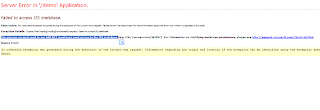
Well,,I found out..This is a common problem when IIS is installed after the framework. Usually fixed by running aspnet_regiis -i


Well,,I found out..This is a common problem when IIS is installed after the framework. Usually fixed by running aspnet_regiis -i
Subscribe to:
Posts (Atom)